

Introduction
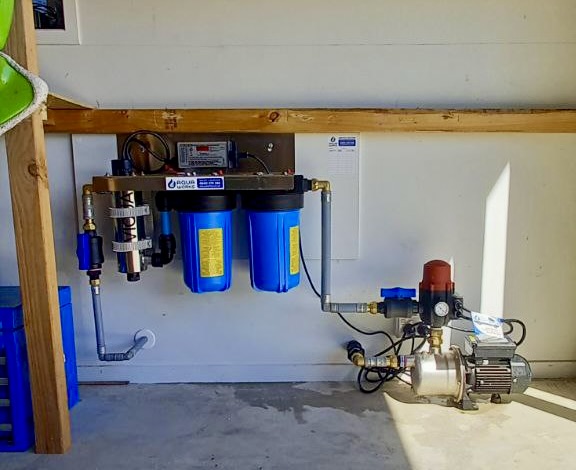
A malfunctioning UV filter can be stressful – particularly if you rely on it for safe, treated water in your home or commercial site. Whether you’re in Auckland or the wider New Zealand region, the good news is you can check several common factors yourself. If the fixes don’t work, it’s time to contact an expert. If you’d prefer professional support straight away, call Aquaworks for prompt servicing and diagnostics.
What Happens When Your UV Filter Stops Working?
When your UV filter system stops operating, you may notice no light in the UV chamber, water discolouration, unusual noise or beeping alarms, or the unit simply gives no output. These are warnings that the water may not be receiving effective UV treatment – which means your water quality can be compromised.
Research from the National Institutes of Health shows that UV systems face performance challenges when components age or get fouled. The review found that UV filter systems often suffer from decreased UV intensity or sensor issues when maintenance is lacking.
5 Checks You Should Make First

1. Check power and system status
- Is the UV unit powered on and receiving electricity?
- Are indicator lights showing normal status (green, no fault lights)? If power is fine but the system still doesn’t light, it could be a circuitry or ballast problem.
2. Inspect the UV lamp (bulb) & its contacts
If the lamp fails to illuminate, the fault is commonly in the lamp itself or its electrical contact. An article from Nordictec Store found that in ~95% of cases the bulb contacts were the issue.
- Ensure the lamp is properly seated and the contacts are clean.
- Look for cracks or damage to the bulb.
Safety note: Always switch off power before inspecting.
3. Examine the quartz sleeve and seals
The quartz sleeve around the lamp must be clean and intact; if it’s clouded, cracked, or its seal fails (O-ring worn), UV output drops and the system may stop working. Clean or replace the sleeve and inspect seals for correct installation.
4. Review water flow and quality upstream
Poor water flow (too slow or blocked) or high turbidity/iron/manganese can overload a UV system and cause it to shut down or under-perform. A general UV disinfection troubleshooting guide lists these as key failure points. Check filters, pre-treatment systems, and whether the UV unit is getting the correct conditions specified by the manufacturer.
5. Check the controller/ballast/sensor module
If the lamp and sleeve are good, and flow is correct, the fault may be in the ballast, starter, or sensor. A detailed troubleshooting guide identifies ballast failure and moisture ingress as common root causes. This is typically where a professional service call is needed.
Are you experiencing persistent beeping from your UV system? This might indicate a specific fault or maintenance need. Find out what it could mean and how to respond by reading our article: UV System Beeping? Here’s What It Means & What to Do Now.
Not sure what’s going on with your UV System?
No worries—give us a call on 0800 278 288. Tell us what you’re seeing and Troy, our qualified plumber will translate the symptoms, talk you through a couple of safe quick checks, and—if a visit makes sense—get a tech on the way.
Summary
Still not working after these checks? Contact Aquaworks for fast, professional fault diagnosis and repair of your UV water filtration system across Auckland and the North Shore.
UV filtration system that are not working means the watwer is not safe to drink. Issue a Boil Water Notice to all consumers downstream until the issue is resolved, the UV system is working, and the water lines have been sterilised.
We have an emergency 24/7 Call Out service – call this number 0212787427
Have an emergency?
We have an emergency 24/7 Call Out service – call this number 0212787427
Preventive Maintenance Tips

Performing regular maintenance reduces the chance of sudden failure:
- Replace the UV lamp annually or per manufacturer recommendation.
- Clean or replace the quartz sleeve and inspect seals.
- Maintain upstream filtration (sediment, iron, manganese, tannins).
- Monitor water quality (turbidity, UV transmissivity).
- Log service dates and component changes.
Want to know more about proper UV system care? We go in-depth in our guide on UV Filter Maintenance – How to Service Your UV System.
Frequently asked questions
Q1: Why won’t my UV filter bulb turn on?
Common causes include faulty bulb contacts, a worn ballast, or the lamp reaching end-of-life. One troubleshooting guide identified bad contacts as root cause in the majority of cases.
Q2: If the light is on, but water still seems untreated, what’s wrong?
Even if the lamp lights, poor water flow, high turbidity, or fouled quartz sleeves can reduce UV effectiveness. Inspect the full system.
Q3: Can a UV filter stop working without any warning lights?
A3: Yes. Some systems won’t alert unless they have advanced sensors. Physical inspection is essential.
Q4: How long do UV bulbs last?
Most UV lamps last around 9,000–10,000 hours, or roughly 12 months of continuous use.
Q5: When should I call a technician?
If you’ve checked power, lamp, sleeve, and flow but the unit still doesn’t work – call a certified technician like Aquaworks for full system diagnostics.
Why Warkworth homeowners choose Aqua Works
We work on rainwater and bore setups every day across Warkworth, Matakana, Snells Beach, Omaha, Leigh, Puhoi and the Mahurangi area. Our vans carry standard parts (switches, valves, seals, cartridges), so many callouts are fixed on the first visit. We provide transparent pricing, friendly advice, and fit the right pump for your property—not just the biggest one on the shelf.
-
-
- Emergency repairs & diagnostics
- Routine servicing & filtration
- New pump supply & installation (including constant-pressure/VSD systems)
- Tank upgrades, suction improvements, and dry-run protection
-
Out of water—or keen to upgrade?
Call Aqua Works on 0800 278 288 or email us on healty@aquaworks.co.nz and we’ll get you sorted.
Water pump failures are stressful, but most are fixable with simple steps or a targeted repair. If the checklist doesn’t bring your system back, we’ll come to you—diagnose, fix, or replace—and make sure it’s set up to stay reliable.